---
title: "Effects in WebRTC: A Filters Tutorial"
description: "Learn how to apply effects to WebRTC in realtime, specifically one of the most popular features of today's social media apps: filters."
image: https://blog.webrtc.ventures/hubfs/Imported_Blog_Media/Effects-in-WebRTC_-A-Filters-Tutorial.png
---
[Skip to content](https://blog.webrtc.ventures/2019/09/effects-in-webrtc-a-filters-tutorial-2#main-content)

- [WebRTC Services](https://webrtc.ventures/webrtc-development-services/)
Show submenu for WebRTC Services
- [Assess](https://webrtc.ventures/services/assess/)
- [Build](https://webrtc.ventures/services/build/)
- [Integrate](https://webrtc.ventures/services/integrate/)
- [Test](https://webrtc.ventures/services/test/)
- [Manage](https://webrtc.ventures/services/manage/)
- [Migrating From Twilio Video](https://webrtc.ventures/twilio-video/)
- Our Partners
Show submenu for Our Partners
- [Amazon Chime SDK](https://webrtc.ventures/partners/amazon-chime-sdk/)
- Stories of Success
Show submenu for Stories of Success
- [Remote Video Interpreting Platform with Agent Routing](https://webrtc.ventures/successes/remote-video-translation-platform/)
- [WebRTC to SIP Gateway for ASL Interpreters](https://webrtc.ventures/successes/webrtc-to-sip-gateway-for-asl-interpreters/)
- [Audio Listening Device to Improve Surgical Outcomes](https://webrtc.ventures/successes/audio-listening-device-to-improve-surgical-outcomes/)
- [Albania’s First Telemedicine Platform](https://webrtc.ventures/successes/albanias-first-telemedicine-platform/)
- [Automated Video Storytelling with the Amazon Chime SDK](https://webrtc.ventures/successes/automated-video-storytelling-with-the-amazon-chime-sdk/)
- [Large Scale Video Conferencing](https://webrtc.ventures/successes/large-scale-video-conferencing/)
- [Broadcasting and Webcast Control Room](https://webrtc.ventures/successes/live-video-broadcasting-and-webcast-control-room/)
- WebRTC Resources
Show submenu for WebRTC Resources
- [WebRTC Live](https://webrtc.ventures/webrtc-live/)
- [WebRTC Tips](https://www.youtube.com/playlist?list=PLayYqdnyegt3QvxX-Rt6wbFIK8727Z5Oz)
- [WebRTC.ventures Blog](https://webrtc.ventures/blog/)
- [Migrating From Twilio Video](https://webrtc.ventures/twilio-video/)
- [WebRTC.ventures Training Program](https://webrtc.ventures/webrtc-ventures-training-program/)
- [About Us](https://webrtc.ventures/our-team/)
Show submenu for About Us
- [Blog](https://webrtc.ventures/blog/)
- [Our Team](https://webrtc.ventures/our-team/)
- [Jobs](https://webrtc.ventures/jobs/)
Open main navigation
Close main navigation
- [WebRTC Services](https://webrtc.ventures/webrtc-development-services/)
Show submenu for WebRTC Services
- [Assess](https://webrtc.ventures/services/assess/)
- [Build](https://webrtc.ventures/services/build/)
- [Integrate](https://webrtc.ventures/services/integrate/)
- [Test](https://webrtc.ventures/services/test/)
- [Manage](https://webrtc.ventures/services/manage/)
- [Migrating From Twilio Video](https://webrtc.ventures/twilio-video/)
- Our Partners
Show submenu for Our Partners
- [Amazon Chime SDK](https://webrtc.ventures/partners/amazon-chime-sdk/)
- Stories of Success
Show submenu for Stories of Success
- [Remote Video Interpreting Platform with Agent Routing](https://webrtc.ventures/successes/remote-video-translation-platform/)
- [WebRTC to SIP Gateway for ASL Interpreters](https://webrtc.ventures/successes/webrtc-to-sip-gateway-for-asl-interpreters/)
- [Audio Listening Device to Improve Surgical Outcomes](https://webrtc.ventures/successes/audio-listening-device-to-improve-surgical-outcomes/)
- [Albania’s First Telemedicine Platform](https://webrtc.ventures/successes/albanias-first-telemedicine-platform/)
- [Automated Video Storytelling with the Amazon Chime SDK](https://webrtc.ventures/successes/automated-video-storytelling-with-the-amazon-chime-sdk/)
- [Large Scale Video Conferencing](https://webrtc.ventures/successes/large-scale-video-conferencing/)
- [Broadcasting and Webcast Control Room](https://webrtc.ventures/successes/live-video-broadcasting-and-webcast-control-room/)
- WebRTC Resources
Show submenu for WebRTC Resources
- [WebRTC Live](https://webrtc.ventures/webrtc-live/)
- [WebRTC Tips](https://www.youtube.com/playlist?list=PLayYqdnyegt3QvxX-Rt6wbFIK8727Z5Oz)
- [WebRTC.ventures Blog](https://webrtc.ventures/blog/)
- [Migrating From Twilio Video](https://webrtc.ventures/twilio-video/)
- [WebRTC.ventures Training Program](https://webrtc.ventures/webrtc-ventures-training-program/)
- [About Us](https://webrtc.ventures/our-team/)
Show submenu for About Us
- [Blog](https://webrtc.ventures/blog/)
- [Our Team](https://webrtc.ventures/our-team/)
- [Jobs](https://webrtc.ventures/jobs/)
- [Contact us](https://webrtc.ventures/contact/)
[Contact us](https://webrtc.ventures/contact/)
Sep 3, 2019 12:00:00 AM
# Effects In WebRTC: A Filters Tutorial
[Hector Zelaya](https://blog.webrtc.ventures/author/hector-zelaya)
Share: [linkedin-in icon](http://www.linkedin.com/shareArticle?mini=true&url=https://blog.webrtc.ventures/2019/09/effects-in-webrtc-a-filters-tutorial-2) [X Twitter icon](https://twitter.com/intent/tweet?url=https://blog.webrtc.ventures/2019/09/effects-in-webrtc-a-filters-tutorial-2) [envelope icon](mailto:?body=https://blog.webrtc.ventures/2019/09/effects-in-webrtc-a-filters-tutorial-2)
In 2015, we shared an article about [applying effects to WebRTC in real time.](https://webrtc.ventures/2015/08/adding-effects-to-webrtc/) A few things have changed since then. Today we bring you a new post about effects in WebRTC — this time discussing one of the most popular features of today’s social media apps: filters.
## Requirements
To follow along, you’ll need [Git](https://git-scm.com/), [Node](https://nodejs.org/en/), and [NPM](https://www.npmjs.com) installed. Installation steps for each operating system will vary, so refer to official documentation when necessary.
Once you have everything installed, we’ll work on top of a running WebRTC application. For this tutorial, we will use the `webRTC` branch of our [webrtc-video-conference-tutorial github repo](https://github.com/agilityfeat/webrtc-video-conference-tutorial/tree/webrtc). (You might want to check out our [eCourse](https://webrtc.ventures/webrtc-training-tutorials-ecourse/) about this!)
The resulting code of the tutorial is available at [webrtc-filters-tutorial repo](https://github.com/agilityfeat/webrtc-filters-tutorial).
## The What, When, and How
The purpose of this tutorial is to establish a WebRTC call and apply a filter to the video stream that we’re sending to the other user. To do this, we should manipulate the stream we get from the `getUserMedia` API and then add it to the `RTCPeerConnection` object.
To achieve this, we’ll use the `Canvas` HTML tag to draw our filters and then we’ll get the stream using the`Canvas.captureStream` method.
We also need to implement face detection to draw filters correctly. To do this, we will use the [face-api.js API](https://github.com/justadudewhohacks/face-api.js).
## Steps
The first thing to do is clone the base repo and switch to `webrtc` branch. To do this from the terminal, navigate to an appropriate folder and run the following commands:
`git clone git@github.com:agilityfeat/webrtc-video-conference-tutorial.git
cd webrtc-video-conference-tutorial
git checkout webrtc`
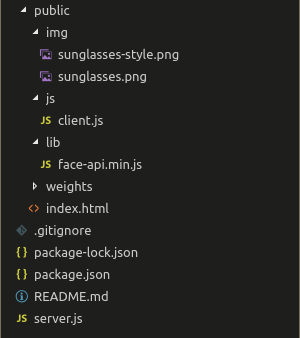
Now we have to make a few changes to the file structure. First, we’ll move the `client.js` file to its own `js` folder. Then we’ll add the `face-api.js` API. Download it [here](https://raw.githubusercontent.com/agilityfeat/webrtc-filters-tutorial/master/public/lib/face-api.min.js) and place it under the `lib` folder. Then download the `weights`[folder](https://github.com/agilityfeat/webrtc-filters-tutorial/tree/master/public/weights) and put it under `public`. You can also download these files from the [official repo](https://github.com/justadudewhohacks/face-api.js).
We also need to add the images that we will use as filters. You can use any images you’d like; just note that you’ll need to adjust the drawing coordinates to fit them into the video. The images used in this tutorial can be downloaded [here](https://github.com/agilityfeat/webrtc-filters-tutorial/tree/master/public/img).
At this point, you should have a file structure similar to the image below. Note our filters under the `img` folder.
[ ](https://blog.webrtc.ventures/hubfs/Imported_Blog_Media/Screenshot-from-2018-11-29-15-20-30-1.png)
Next, open `index.html` and replace the `localVideo` tag with a canvas, as shown below.
[ ](https://blog.webrtc.ventures/hubfs/Imported_Blog_Media/Screenshot-from-2018-11-29-15-24-03-1.png)
Update the `script` tag for `client.js` and add a new one for `face-api.js`.
[ ](https://blog.webrtc.ventures/hubfs/Imported_Blog_Media/Screenshot-from-2018-11-29-15-25-48.png)
Now open `js/client.js`. We will begin by removing the reference to the removed video tag and adding a reference for the canvas.
[ ](https://blog.webrtc.ventures/hubfs/Imported_Blog_Media/Screenshot-from-2018-11-29-16-56-12.png)
After that, we will reorganize the code a little bit. First, rearrange the variables and constants as shown below.
[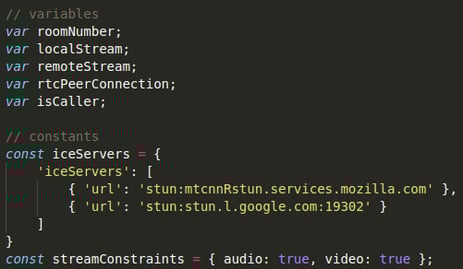 ](https://blog.webrtc.ventures/hubfs/Imported_Blog_Media/Screenshot-from-2018-11-29-15-35-14.png)
Next, we will set the parameters of our face detection mechanism and add an array to store its coordinates. We’re also adding a function that will get those coordinates.
[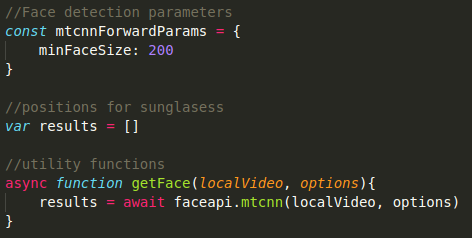 ](https://blog.webrtc.ventures/hubfs/Imported_Blog_Media/Screenshot-from-2018-11-29-15-43-58.png)
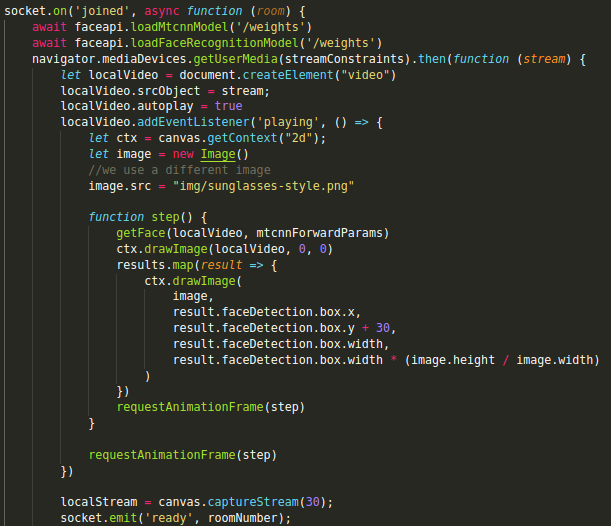
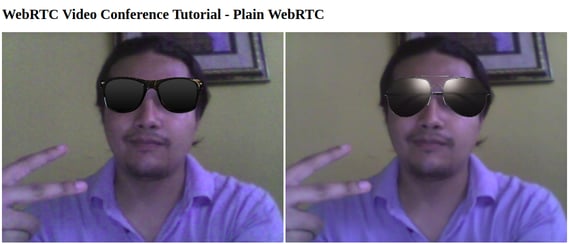
Now we’re ready to apply the filter to our stream. For this tutorial, we will set a fixed filter to each user. User 1 will get normal sunglasses and User 2 will get some more stylish ones.
The idea is that after we execute the `getUserMedia` API, we set the resulting stream to a `video` HTML tag. Then we’ll take that tag and draw it into a canvas. There we’ll be able to draw the filter on top of it.
Finally, we’ll get the stream from the canvas using the `Canvas.captureStream` method and assign it to our `PeerConnection`. The other user would receive the stream that has the filter.
In the base application, `getUserMedia` is executed both when User 1 has created a new room and when User 2 has joined to it. We will use each one to set a different filter for each user.
Modify the `getUserMedia` code for the `created` event as follows.
[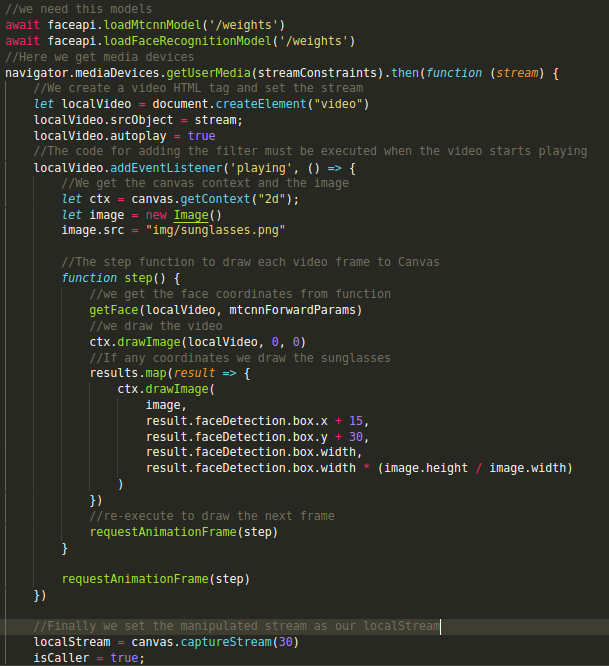 ](https://blog.webrtc.ventures/hubfs/Imported_Blog_Media/Screenshot-from-2018-11-29-16-00-44.png)
Add the code to the `joined` event. This time, specify a different image.
[ ](https://blog.webrtc.ventures/hubfs/Imported_Blog_Media/Screenshot-from-2018-11-29-16-02-55.png)
Now we’re ready to see our filters in action! Using the terminal, navigate to the project folder and run the application as follows.
`npm install
node server.js`
Then open two different Chrome windows and go to `http://localhost:3000`. Enter the same room number in both of them and click “Go.” You should see something like this:
[ ](https://blog.webrtc.ventures/hubfs/Imported_Blog_Media/Screenshot-from-2018-11-29-17-12-37-1.png)
## Conclusion
As you can see, it’s fairly simple to add fancy effects like filters to a WebRTC application. Be sure to check our [other tutorials](https://webrtc.ventures/webrtc-training-tutorials-ecourse/) if you want to know more about WebRTC!
[CPaaS](https://blog.webrtc.ventures/tag/cpaas), [Managed Services](https://blog.webrtc.ventures/tag/managed-services), [Events](https://blog.webrtc.ventures/tag/events), [Video Conferencing](https://blog.webrtc.ventures/tag/video-conferencing), [Real Time Weekly](https://blog.webrtc.ventures/tag/real-time-weekly), [WebRTC Architecture](https://blog.webrtc.ventures/tag/webrtc-architecture), [Broadcasting](https://blog.webrtc.ventures/tag/broadcasting), [Medical](https://blog.webrtc.ventures/tag/medical), [WebRTC Live](https://blog.webrtc.ventures/tag/webrtc-live), [Showcase](https://blog.webrtc.ventures/tag/showcase), [Thoughts](https://blog.webrtc.ventures/tag/thoughts), [Vonage](https://blog.webrtc.ventures/tag/vonage), [Daily](https://blog.webrtc.ventures/tag/daily), [Jobs](https://blog.webrtc.ventures/tag/jobs), [Contact Centers](https://blog.webrtc.ventures/tag/contact-centers), [Telehealth](https://blog.webrtc.ventures/tag/telehealth), [Education](https://blog.webrtc.ventures/tag/education), [Technical](https://blog.webrtc.ventures/tag/technical), [General](https://blog.webrtc.ventures/tag/general), [Story of success](https://blog.webrtc.ventures/tag/story-of-success), [The WebRTC.ventures Blog](https://blog.webrtc.ventures/tag/the-webrtc-ventures-blog), [Testing](https://blog.webrtc.ventures/tag/testing), [Gaming](https://blog.webrtc.ventures/tag/gaming), [DevOps](https://blog.webrtc.ventures/tag/devops), [Symbl.ai](https://blog.webrtc.ventures/tag/symbl-ai)
## Related posts
[](https://blog.webrtc.ventures/2018/12/effects-in-webrtc-a-filters-tutorial)
## [Effects In WebRTC? A Filters Tutorial](https://blog.webrtc.ventures/2018/12/effects-in-webrtc-a-filters-tutorial)
[Hector Zelaya](https://blog.webrtc.ventures/author/hector-zelaya)
Dec 12, 2018 12:00:00 AM
Back in 2015, we shared an article about how to apply effects to WebRTC in realtime. Since then a...
[Read more](https://blog.webrtc.ventures/2018/12/effects-in-webrtc-a-filters-tutorial)
[](https://blog.webrtc.ventures/2022/12/hamza-vonage-attention-detection)
## [Hamza blogs on Vonage about Attention Detection with the Vonage Video API](https://blog.webrtc.ventures/2022/12/hamza-vonage-attention-detection)
 [Jen Oppenheimer](https://blog.webrtc.ventures/author/jen-oppenheimer)
Dec 1, 2022 12:00:00 AM
Hamza Nasir is a WebRTC Developer on the WebRTC.ventures team currently working with Vonage on...
[Read more](https://blog.webrtc.ventures/2022/12/hamza-vonage-attention-detection)
[](https://blog.webrtc.ventures/2019/08/telehealth-starter-kit-series-appointment-reminders)
## [Telehealth Starter Kit Series: Appointment Reminders](https://blog.webrtc.ventures/2019/08/telehealth-starter-kit-series-appointment-reminders)
[Paige Long](https://blog.webrtc.ventures/author/paige-long)
Aug 15, 2019 12:00:00 AM
Welcome to our telehealth starter kit blog series! For the rest of the summer, we’ll focus on one...
[Read more](https://blog.webrtc.ventures/2019/08/telehealth-starter-kit-series-appointment-reminders)
### WebRTC.Ventures Services
...
- Assess
- Build
- Integrate
- Test
- Deploy & Manage
### Contact Us
...
**Video should be an opportunity, not a headache.**
We’re here to build, integrate, assess and optimize, test, and even deploy and manage your live video application.
[Contact us](https://blog.webrtc.ventures/2019/09/effects-in-webrtc-a-filters-tutorial-2#contact)
### WebRTC Live
...
View [past episodes](https://blog.webrtc.ventures/webrtc-live/) of our webinar interview series about the latest webRTC use cases and technical updates. Join our mailing list to learn about upcoming episodes!


We’re one of the few agencies in the world dedicated to WebRTC development. This dedication and experience is why so many people trust us to help bring live video application dreams to life.
### Let's get started!
###### **[Contact us today](https://webrtc.ventures/contact/)**
**[info@webrtc.ventures](mailto:info@webrtc.ventures)**
### Join our mailing list
We don't e-mail often (a few times a month max), and it will be worth it when we do! Of course, we respect your privacy and will not share your contact information.
© 2023 WebRTC.ventures, an [AgilityFeat](https://agilityfeat.com/) company / [Privacy Policy](https://webrtc.ventures/privacy-policy//)
```json
{
"@context" : "https://schema.org",
"@type" : "BlogPosting",
"author" : {
"@type" : "Person",
"name" : "Hector Zelaya",
"url" : "https://blog.webrtc.ventures/author/hector-zelaya"
},
"dateModified" : "2024-04-03T17:53:41.952Z",
"datePublished" : "2019-09-03T04:00:00.000Z",
"headline" : "Effects in WebRTC: A Filters Tutorial",
"image" : [ "https://blog.webrtc.ventures/hubfs/Imported_Blog_Media/Effects-in-WebRTC_-A-Filters-Tutorial.png" ],
"mainEntityOfPage" : {
"@id" : "https://blog.webrtc.ventures/2019/09/effects-in-webrtc-a-filters-tutorial-2",
"@type" : "WebPage"
},
"publisher" : {
"@type" : "Organization",
"logo" : {
"@type" : "ImageObject",
"url" : "https://blog.webrtc.ventures/hubfs/logo-main-light.svg"
}
}
}
```