---
title: Configuring FreeSWITCH as a WebRTC MCU Media Server – WebRTC.ventures
description: MCUs are time-tested approaches to setting up conferences via bridges. Conference bridges add centralized call and media features like mixing, quality control, secure PIN-based access, and more. They are also ideal for connecting mixed streams with media pipelines for recording, broadcasting or plugging into machine learning models. Altanai shows us how to configure FreeSWITCH as a WebRTC Multipart conferencing server using a video mixer and conference bridge.
image: https://blog.webrtc.ventures/hubfs/Imported_Blog_Media/Configuring-FreeSWITCH-as-a-WebRTC-MCU-Media-Server.png
---
[Skip to content](https://blog.webrtc.ventures/2022/02/configuring-freeswitch-mcu-webrtc#main-content)

- [WebRTC Services](https://webrtc.ventures/webrtc-development-services/)
Show submenu for WebRTC Services
- [Assess](https://webrtc.ventures/services/assess/)
- [Build](https://webrtc.ventures/services/build/)
- [Integrate](https://webrtc.ventures/services/integrate/)
- [Test](https://webrtc.ventures/services/test/)
- [Manage](https://webrtc.ventures/services/manage/)
- [Migrating From Twilio Video](https://webrtc.ventures/twilio-video/)
- Our Partners
Show submenu for Our Partners
- [Amazon Chime SDK](https://webrtc.ventures/partners/amazon-chime-sdk/)
- Stories of Success
Show submenu for Stories of Success
- [Remote Video Interpreting Platform with Agent Routing](https://webrtc.ventures/successes/remote-video-translation-platform/)
- [WebRTC to SIP Gateway for ASL Interpreters](https://webrtc.ventures/successes/webrtc-to-sip-gateway-for-asl-interpreters/)
- [Audio Listening Device to Improve Surgical Outcomes](https://webrtc.ventures/successes/audio-listening-device-to-improve-surgical-outcomes/)
- [Albania’s First Telemedicine Platform](https://webrtc.ventures/successes/albanias-first-telemedicine-platform/)
- [Automated Video Storytelling with the Amazon Chime SDK](https://webrtc.ventures/successes/automated-video-storytelling-with-the-amazon-chime-sdk/)
- [Large Scale Video Conferencing](https://webrtc.ventures/successes/large-scale-video-conferencing/)
- [Broadcasting and Webcast Control Room](https://webrtc.ventures/successes/live-video-broadcasting-and-webcast-control-room/)
- WebRTC Resources
Show submenu for WebRTC Resources
- [WebRTC Live](https://webrtc.ventures/webrtc-live/)
- [WebRTC Tips](https://www.youtube.com/playlist?list=PLayYqdnyegt3QvxX-Rt6wbFIK8727Z5Oz)
- [WebRTC.ventures Blog](https://webrtc.ventures/blog/)
- [Migrating From Twilio Video](https://webrtc.ventures/twilio-video/)
- [WebRTC.ventures Training Program](https://webrtc.ventures/webrtc-ventures-training-program/)
- [About Us](https://webrtc.ventures/our-team/)
Show submenu for About Us
- [Blog](https://webrtc.ventures/blog/)
- [Our Team](https://webrtc.ventures/our-team/)
- [Jobs](https://webrtc.ventures/jobs/)
Open main navigation
Close main navigation
- [WebRTC Services](https://webrtc.ventures/webrtc-development-services/)
Show submenu for WebRTC Services
- [Assess](https://webrtc.ventures/services/assess/)
- [Build](https://webrtc.ventures/services/build/)
- [Integrate](https://webrtc.ventures/services/integrate/)
- [Test](https://webrtc.ventures/services/test/)
- [Manage](https://webrtc.ventures/services/manage/)
- [Migrating From Twilio Video](https://webrtc.ventures/twilio-video/)
- Our Partners
Show submenu for Our Partners
- [Amazon Chime SDK](https://webrtc.ventures/partners/amazon-chime-sdk/)
- Stories of Success
Show submenu for Stories of Success
- [Remote Video Interpreting Platform with Agent Routing](https://webrtc.ventures/successes/remote-video-translation-platform/)
- [WebRTC to SIP Gateway for ASL Interpreters](https://webrtc.ventures/successes/webrtc-to-sip-gateway-for-asl-interpreters/)
- [Audio Listening Device to Improve Surgical Outcomes](https://webrtc.ventures/successes/audio-listening-device-to-improve-surgical-outcomes/)
- [Albania’s First Telemedicine Platform](https://webrtc.ventures/successes/albanias-first-telemedicine-platform/)
- [Automated Video Storytelling with the Amazon Chime SDK](https://webrtc.ventures/successes/automated-video-storytelling-with-the-amazon-chime-sdk/)
- [Large Scale Video Conferencing](https://webrtc.ventures/successes/large-scale-video-conferencing/)
- [Broadcasting and Webcast Control Room](https://webrtc.ventures/successes/live-video-broadcasting-and-webcast-control-room/)
- WebRTC Resources
Show submenu for WebRTC Resources
- [WebRTC Live](https://webrtc.ventures/webrtc-live/)
- [WebRTC Tips](https://www.youtube.com/playlist?list=PLayYqdnyegt3QvxX-Rt6wbFIK8727Z5Oz)
- [WebRTC.ventures Blog](https://webrtc.ventures/blog/)
- [Migrating From Twilio Video](https://webrtc.ventures/twilio-video/)
- [WebRTC.ventures Training Program](https://webrtc.ventures/webrtc-ventures-training-program/)
- [About Us](https://webrtc.ventures/our-team/)
Show submenu for About Us
- [Blog](https://webrtc.ventures/blog/)
- [Our Team](https://webrtc.ventures/our-team/)
- [Jobs](https://webrtc.ventures/jobs/)
- [Contact us](https://webrtc.ventures/contact/)
[Contact us](https://webrtc.ventures/contact/)
Feb 17, 2022 12:00:00 AM
# Configuring FreeSWITCH as a WebRTC MCU Media Server
 [Jen Oppenheimer](https://blog.webrtc.ventures/author/jen-oppenheimer)
Share: [linkedin-in icon](http://www.linkedin.com/shareArticle?mini=true&url=https://blog.webrtc.ventures/2022/02/configuring-freeswitch-mcu-webrtc) [X Twitter icon](https://twitter.com/intent/tweet?url=https://blog.webrtc.ventures/2022/02/configuring-freeswitch-mcu-webrtc) [envelope icon](mailto:?body=https://blog.webrtc.ventures/2022/02/configuring-freeswitch-mcu-webrtc)
A Media Control Unit or MCU is the most established and time tested approach to setting up conferences via bridges. Conference bridges add centralized call and media features like mixing and quality control among other advanced controls such as a DID number, announcement, admin control, secure PIN-based access. Due to centralized media management, they are also ideal for connecting mixed streams with media pipelines for recording, broadcasting or plugging into machine learning models for transcription for NLP or sentiment analysis. This post will cover using [FreeSWITCH](https://freeswitch.com/)as a WebRTC Multipart conferencing server using a video mixer and conference bridge.
 
Mixer for bridging calls from heterogeneous endpoints
This is heavily reliant on a media server with a mixer for audio and/or video streams. Meeting rooms often involve a bridge with dozens of participants that multiplex their incoming audio and video streams into one output and input stream per participant.
## Sources of energy consumption
Sources of energy consumption in a MCU based conference:
- Transmission: 2 \* transmission\_energy (kWh) \* n
- Device (media): 2 \* device\_energy (kWh) \* n
- Signaling Server: signaling\_energy (kWh) \* n
- Media Server: mediaserver\_energy (kWh) \* n
Relatively higher energy consumption in Mesh based (peer to peer) conference:
- Transmission: transmission\_energy (kWh) \* n \* (n-1)
- Device: device\_energy (kWh) \* n \* (n-1)
- Signaling Server: signaling\_energy (kWh) \* n
- Media Server: 0
In this fashion of a centralized setup, the CPU consumption is highest at the centre at the media server. This is due to MCU’s real-time media processing that may include decoding, mixing and re-encoding every stream and mixing as one. It should be noted that CPU consumption could be higher where a centralized server does extensive transcoding between peers supporting different codecs.
On the other hand, the CPU utilization is lowest at receivers who only need to decode one single stream incoming stream from the media server. On the side, extra latency caused by media server decoding necessitates the use of a jitter buffer.
 
Figure: relative client side energy consumption of different RTP topologies
# Installation and Setup of FreeSWITCH for Video MCU
> FreeSWITCH™ is an open source carrier-grade telephony platform implemented as a back-to-back user agent.
[FreeSWITCH](https://freeswitch.com/) is a SIP standard specific communication platform that forms the core of many cloud telephony and communication services. The pluggable modules make FreeSWITCH suited to almost any role in a SIP platform (SBC, gateway, SIP application server, media server, etc.). Let’s set up FreeSWITCH as a WebRTC MCU using a video mixer and conference bridge.
More configuration files related to this setup can be located at [https://github.com/agilityfeat/Energyefficient\_WebRTC\_Asterisk\_systems/tree/master/Freeswitch\_MCU\_Webrtc](https://github.com/agilityfeat/Energyefficient_WebRTC_Asterisk_systems/tree/master/Freeswitch_MCU_Webrtc)
Configuration files for freeswitch. Below is a sippet of **freeswitch.xml**
 
The **vars.xml** is the most important file ( according to me ) for starting freeswitch as it contains the Preprocessor Variables. These values should be consistent across the modules
The **internal.xml** manages the configuration for internal clients such as SIP endpoints registered with the SIP server.
```
```
# Conference Layout
The **Conference.xml** is critical to setup the bridges and allow for mixing. The Conference\_layout.conf enables us to add various layouts for users. Once a conference begins this is the layout for incoming video that will be assembled and sent out to all participants.
```
1x1
2x2
```
# Users
Each extension contains a parameter “context” that matches a diaplan in conf/dialplan/.
When FreeSWITCH gets a register packet it looks for the user in the directory based on the domain in the packet depending on how sofia profile is configured. For this demo, I have set auth to false since I will only be using dial in extensions for users to join the bridge.
My user profile
```
```
## Dialplan
conf/dialplan/ contain XML files for dialplan
 
For this demo, I am using the video-mcu-stereo conf profile (shown below) which allows the communication service provider to add sounds for user activity as join, leave, mute, locked out, wrong pin and even other advanced features such as comfort noise, video canvas layout among others. There are many other samples for the video MCU configuration and one can always design their custom configuration.
```
```
# Security certs and WSS Binding
Add certs like /usr/local/freeswitch/certs/wss.pem shown below
Add wss-bind-url in internal.xml
```
```
Check that profile is loaded
```
sofia status profile internal
```
 
screenshot for sofia status profile internal
Give permission to wss page. For this example my ip and port made this url which I gave advanced permissions to.
 
Screenshot for advanced permission for self signed security keys
# WebRTC Clients
Using jssip for 2 clients.
 
screenshot for registering client on JSSIP for Freeswitch MCU server
Monitor Successful registration on sofia by checking registrations by profile with the command
```
sofia status profile reg
```
 
Profile lookup on sofia for registrations
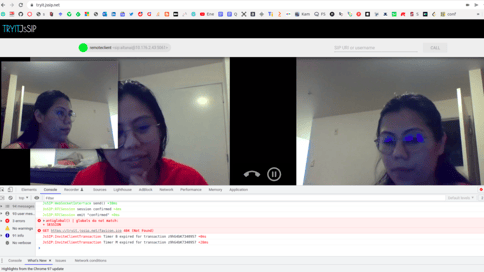 
Two party WebRTC conference via FreeSWITCH Video MCU Server (remote video is mixed with local)
For Multiparty conference trials one can use [Cyber Mega Phone 2K Ultimate Dynamic Edition](https://github.com/asterisk/cyber_mega_phone_2k) browser side client application by Digium.
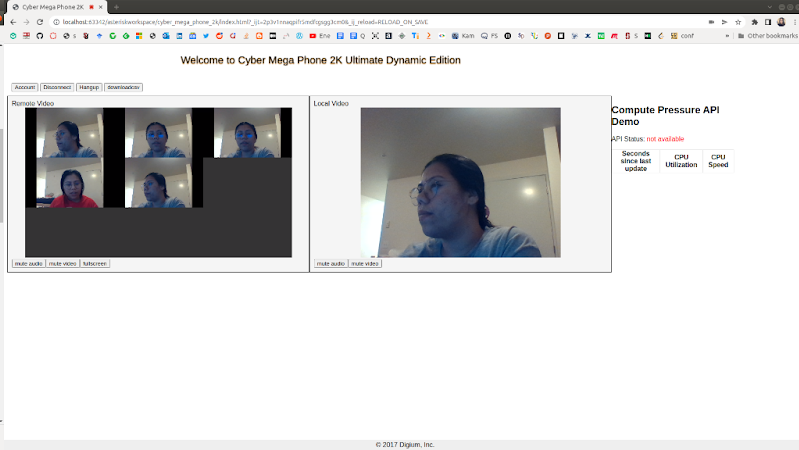 
Multiparty WebRTC conference via Freeswitch Video MCU Server
# Up Next
The last blog post in this series will compare the SFU and MCU against Mesh using Chrome’s energy usage in ‘Analyzing compute and energy consumption of the most popular video conferencing topologies’ that indicates the carbon footprint of a conference call.
## About the Author: Altanai Bisht
[ ](https://www.linkedin.com/in/altanai/)
Here at [WebRTC.ventures](https://webrtc.ventures/contact/), we pride ourselves on offering our clients the opportunity to work with extremely bright developers, like Altanai. Don’t trust your [custom video solution](https://webrtc.ventures/custom-applications/) to just anyone. Trust the experts!
[CPaaS](https://blog.webrtc.ventures/tag/cpaas), [Managed Services](https://blog.webrtc.ventures/tag/managed-services), [Events](https://blog.webrtc.ventures/tag/events), [Video Conferencing](https://blog.webrtc.ventures/tag/video-conferencing), [Real Time Weekly](https://blog.webrtc.ventures/tag/real-time-weekly), [WebRTC Architecture](https://blog.webrtc.ventures/tag/webrtc-architecture), [Broadcasting](https://blog.webrtc.ventures/tag/broadcasting), [Medical](https://blog.webrtc.ventures/tag/medical), [WebRTC Live](https://blog.webrtc.ventures/tag/webrtc-live), [Showcase](https://blog.webrtc.ventures/tag/showcase), [Thoughts](https://blog.webrtc.ventures/tag/thoughts), [Vonage](https://blog.webrtc.ventures/tag/vonage), [Daily](https://blog.webrtc.ventures/tag/daily), [Jobs](https://blog.webrtc.ventures/tag/jobs), [Contact Centers](https://blog.webrtc.ventures/tag/contact-centers), [Telehealth](https://blog.webrtc.ventures/tag/telehealth), [Education](https://blog.webrtc.ventures/tag/education), [Technical](https://blog.webrtc.ventures/tag/technical), [General](https://blog.webrtc.ventures/tag/general), [Story of success](https://blog.webrtc.ventures/tag/story-of-success), [The WebRTC.ventures Blog](https://blog.webrtc.ventures/tag/the-webrtc-ventures-blog), [Testing](https://blog.webrtc.ventures/tag/testing), [Gaming](https://blog.webrtc.ventures/tag/gaming), [DevOps](https://blog.webrtc.ventures/tag/devops), [Symbl.ai](https://blog.webrtc.ventures/tag/symbl-ai)
## Related posts
[](https://blog.webrtc.ventures/2023/07/alberto-gonzalez-to-present-at-cluecon-2023)
## [Alberto Gonzalez to Speak at ClueCon 2023](https://blog.webrtc.ventures/2023/07/alberto-gonzalez-to-present-at-cluecon-2023)
 [Jen Oppenheimer](https://blog.webrtc.ventures/author/jen-oppenheimer)
Jul 3, 2023 12:00:00 AM
Our CTO, Alberto Gonzalez, will be a speaker at ClueCon 2023, an annual technology conference...
[Read more](https://blog.webrtc.ventures/2023/07/alberto-gonzalez-to-present-at-cluecon-2023)
[](https://blog.webrtc.ventures/2019/06/allthingsrtc-2019)
## [AllThingsRTC 2019](https://blog.webrtc.ventures/2019/06/allthingsrtc-2019)
[Hamza Nasir](https://blog.webrtc.ventures/author/hamza-nasir)
Jun 18, 2019 12:00:00 AM
Last week, WebRTC.ventures was invited to the AllThingsRTC 2019 conference hosted by Agora.io in...
[Read more](https://blog.webrtc.ventures/2019/06/allthingsrtc-2019)
[](https://blog.webrtc.ventures/2018/07/tutorial-build-video-conference-application-webrtc-2)
## [\[Tutorial\] How to Build a Video Conference Application with WebRTC](https://blog.webrtc.ventures/2018/07/tutorial-build-video-conference-application-webrtc-2)
[Hector Zelaya](https://blog.webrtc.ventures/author/hector-zelaya)
Jul 26, 2018 12:00:00 AM
In this blog post, we will provide a tutorial on how to build a video conference application using...
[Read more](https://blog.webrtc.ventures/2018/07/tutorial-build-video-conference-application-webrtc-2)
### WebRTC.Ventures Services
...
- Assess
- Build
- Integrate
- Test
- Deploy & Manage
### Contact Us
...
**Video should be an opportunity, not a headache.**
We’re here to build, integrate, assess and optimize, test, and even deploy and manage your live video application.
[Contact us](https://blog.webrtc.ventures/2022/02/configuring-freeswitch-mcu-webrtc#contact)
### WebRTC Live
...
View [past episodes](https://blog.webrtc.ventures/webrtc-live/) of our webinar interview series about the latest webRTC use cases and technical updates. Join our mailing list to learn about upcoming episodes!


We’re one of the few agencies in the world dedicated to WebRTC development. This dedication and experience is why so many people trust us to help bring live video application dreams to life.
### Let's get started!
###### **[Contact us today](https://webrtc.ventures/contact/)**
**[info@webrtc.ventures](mailto:info@webrtc.ventures)**
### Join our mailing list
We don't e-mail often (a few times a month max), and it will be worth it when we do! Of course, we respect your privacy and will not share your contact information.
© 2023 WebRTC.ventures, an [AgilityFeat](https://agilityfeat.com/) company / [Privacy Policy](https://webrtc.ventures/privacy-policy//)
```json
{
"@context" : "https://schema.org",
"@type" : "BlogPosting",
"author" : {
"@type" : "Person",
"name" : "Jen Oppenheimer",
"url" : "https://blog.webrtc.ventures/author/jen-oppenheimer"
},
"dateModified" : "2024-04-03T18:07:32.123Z",
"datePublished" : "2022-02-17T05:00:00.000Z",
"headline" : "Configuring FreeSWITCH as a WebRTC MCU Media Server – WebRTC.ventures",
"image" : [ "https://blog.webrtc.ventures/hubfs/Imported_Blog_Media/Configuring-FreeSWITCH-as-a-WebRTC-MCU-Media-Server.png" ],
"mainEntityOfPage" : {
"@id" : "https://blog.webrtc.ventures/2022/02/configuring-freeswitch-mcu-webrtc",
"@type" : "WebPage"
},
"publisher" : {
"@type" : "Organization",
"logo" : {
"@type" : "ImageObject",
"url" : "https://blog.webrtc.ventures/hubfs/logo-main-light.svg"
}
}
}
```