---
title: Active Speaker Detection with the Amazon Chime SDK – WebRTC.ventures
description: "Capitalizing on the considerable flexibility that the Amazon Chime SDK offers for customizing the UI, Marcell takes yet another step in our growing demo application: active speaker detection to identify who is talking and manipulate the user interface to favor that stream over the rest."
image: https://blog.webrtc.ventures/hubfs/Imported_Blog_Media/Active-Speaker-Detection-with-the-Amazon-Chime-SDK-2.png
---
[Skip to content](https://blog.webrtc.ventures/2022/11/active-speaker-detection-with-the-amazon-chime-sdk#main-content)

- [WebRTC Services](https://webrtc.ventures/webrtc-development-services/)
Show submenu for WebRTC Services
- [Assess](https://webrtc.ventures/services/assess/)
- [Build](https://webrtc.ventures/services/build/)
- [Integrate](https://webrtc.ventures/services/integrate/)
- [Test](https://webrtc.ventures/services/test/)
- [Manage](https://webrtc.ventures/services/manage/)
- [Migrating From Twilio Video](https://webrtc.ventures/twilio-video/)
- Our Partners
Show submenu for Our Partners
- [Amazon Chime SDK](https://webrtc.ventures/partners/amazon-chime-sdk/)
- Stories of Success
Show submenu for Stories of Success
- [Remote Video Interpreting Platform with Agent Routing](https://webrtc.ventures/successes/remote-video-translation-platform/)
- [WebRTC to SIP Gateway for ASL Interpreters](https://webrtc.ventures/successes/webrtc-to-sip-gateway-for-asl-interpreters/)
- [Audio Listening Device to Improve Surgical Outcomes](https://webrtc.ventures/successes/audio-listening-device-to-improve-surgical-outcomes/)
- [Albania’s First Telemedicine Platform](https://webrtc.ventures/successes/albanias-first-telemedicine-platform/)
- [Automated Video Storytelling with the Amazon Chime SDK](https://webrtc.ventures/successes/automated-video-storytelling-with-the-amazon-chime-sdk/)
- [Large Scale Video Conferencing](https://webrtc.ventures/successes/large-scale-video-conferencing/)
- [Broadcasting and Webcast Control Room](https://webrtc.ventures/successes/live-video-broadcasting-and-webcast-control-room/)
- WebRTC Resources
Show submenu for WebRTC Resources
- [WebRTC Live](https://webrtc.ventures/webrtc-live/)
- [WebRTC Tips](https://www.youtube.com/playlist?list=PLayYqdnyegt3QvxX-Rt6wbFIK8727Z5Oz)
- [WebRTC.ventures Blog](https://webrtc.ventures/blog/)
- [Migrating From Twilio Video](https://webrtc.ventures/twilio-video/)
- [WebRTC.ventures Training Program](https://webrtc.ventures/webrtc-ventures-training-program/)
- [About Us](https://webrtc.ventures/our-team/)
Show submenu for About Us
- [Blog](https://webrtc.ventures/blog/)
- [Our Team](https://webrtc.ventures/our-team/)
- [Jobs](https://webrtc.ventures/jobs/)
Open main navigation
Close main navigation
- [WebRTC Services](https://webrtc.ventures/webrtc-development-services/)
Show submenu for WebRTC Services
- [Assess](https://webrtc.ventures/services/assess/)
- [Build](https://webrtc.ventures/services/build/)
- [Integrate](https://webrtc.ventures/services/integrate/)
- [Test](https://webrtc.ventures/services/test/)
- [Manage](https://webrtc.ventures/services/manage/)
- [Migrating From Twilio Video](https://webrtc.ventures/twilio-video/)
- Our Partners
Show submenu for Our Partners
- [Amazon Chime SDK](https://webrtc.ventures/partners/amazon-chime-sdk/)
- Stories of Success
Show submenu for Stories of Success
- [Remote Video Interpreting Platform with Agent Routing](https://webrtc.ventures/successes/remote-video-translation-platform/)
- [WebRTC to SIP Gateway for ASL Interpreters](https://webrtc.ventures/successes/webrtc-to-sip-gateway-for-asl-interpreters/)
- [Audio Listening Device to Improve Surgical Outcomes](https://webrtc.ventures/successes/audio-listening-device-to-improve-surgical-outcomes/)
- [Albania’s First Telemedicine Platform](https://webrtc.ventures/successes/albanias-first-telemedicine-platform/)
- [Automated Video Storytelling with the Amazon Chime SDK](https://webrtc.ventures/successes/automated-video-storytelling-with-the-amazon-chime-sdk/)
- [Large Scale Video Conferencing](https://webrtc.ventures/successes/large-scale-video-conferencing/)
- [Broadcasting and Webcast Control Room](https://webrtc.ventures/successes/live-video-broadcasting-and-webcast-control-room/)
- WebRTC Resources
Show submenu for WebRTC Resources
- [WebRTC Live](https://webrtc.ventures/webrtc-live/)
- [WebRTC Tips](https://www.youtube.com/playlist?list=PLayYqdnyegt3QvxX-Rt6wbFIK8727Z5Oz)
- [WebRTC.ventures Blog](https://webrtc.ventures/blog/)
- [Migrating From Twilio Video](https://webrtc.ventures/twilio-video/)
- [WebRTC.ventures Training Program](https://webrtc.ventures/webrtc-ventures-training-program/)
- [About Us](https://webrtc.ventures/our-team/)
Show submenu for About Us
- [Blog](https://webrtc.ventures/blog/)
- [Our Team](https://webrtc.ventures/our-team/)
- [Jobs](https://webrtc.ventures/jobs/)
- [Contact us](https://webrtc.ventures/contact/)
[Contact us](https://webrtc.ventures/contact/)
Nov 21, 2022 12:00:00 AM
# Active Speaker Detection with the Amazon Chime SDK
[Marcell Silva](https://blog.webrtc.ventures/author/marcell-silva)
Share: [linkedin-in icon](http://www.linkedin.com/shareArticle?mini=true&url=https://blog.webrtc.ventures/2022/11/active-speaker-detection-with-the-amazon-chime-sdk) [X Twitter icon](https://twitter.com/intent/tweet?url=https://blog.webrtc.ventures/2022/11/active-speaker-detection-with-the-amazon-chime-sdk) [envelope icon](mailto:?body=https://blog.webrtc.ventures/2022/11/active-speaker-detection-with-the-amazon-chime-sdk)
In previous posts, we showed you [how to build a two-party video chat](https://webrtc.ventures/2022/10/building-a-video-chat-with-the-amazon-chime-sdk/) and [how to build a multi-party video conference](https://webrtc.ventures/2022/10/building-a-multi-party-video-conference-with-the-amazon-chime-sdk/), both using the [Amazon Chime SDK](https://aws.amazon.com/chime/chime-sdk/). Capitalizing on the considerable flexibility that the Amazon Chime SDK offers for customizing the UI, we’re going to take yet another step in our application and add a new feature: active speaker detection to create a pinned video feed. This ability to implement any sort of visual design on top of a simple back end is just another reason our team at [WebRTC.ventures](https://webrtc.ventures) is loving building with the Amazon Chime SDK!
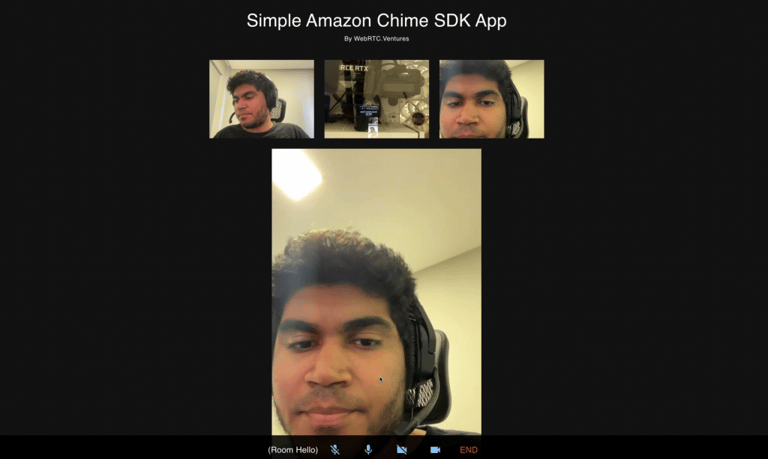
Imagine a call with 30 people and one of them starts talking, you’d need to basically search for this person in a crowd. This feature allows us to identify the active speaker and manipulate the user interface to favor that stream over the rest. The main benefits are an improved user experience and the possibility to optimize bandwidth to improve call quality.
Below, we can see that the peer talking at the moment has more focus on the screen than the rest of the peers who are quietly watching.
[ ](https://blog.webrtc.ventures/hubfs/Imported_Blog_Media/simple-chime-app-sdk-demo.png)
As when we moved from the two-party chat to the multi-party conference, we’ll be only changing the front end code. We can use the same backend we built previously. The full code of this demo is available on GitHub:
- [https://github.com/WebRTCventures/simple-chime-frontend](https://github.com/WebRTCventures/simple-chime-frontend)
- [https://github.com/WebRTCventures/simple-chime-backend](https://github.com/WebRTCventures/simple-chime-backend)
## Planning our work
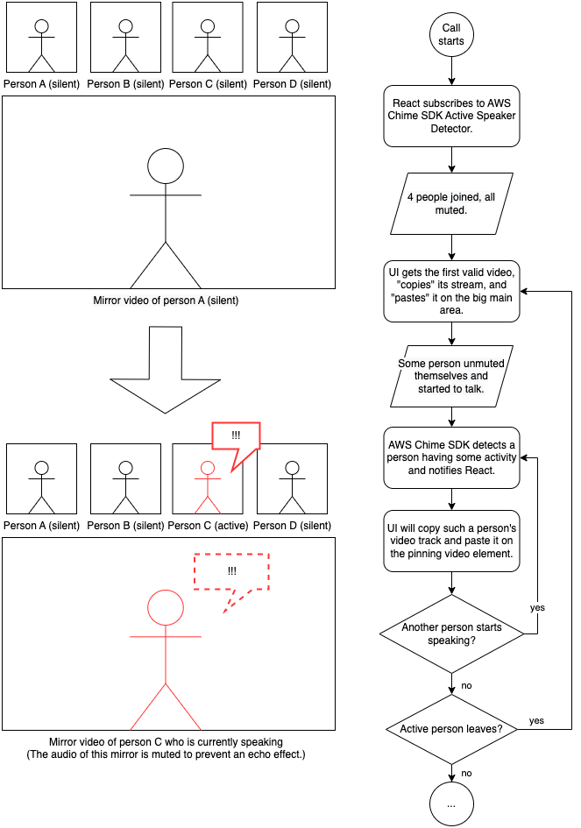
Here’s a drawing of what we’re going to implement. Assume that you’re the Person A and the first to join the meeting:
[ ](https://blog.webrtc.ventures/hubfs/Imported_Blog_Media/Pinned-speaker.png)
## Getting to work
First, we’ll write the code responsible for “copying” the stream from an element and “pasting” on a given element responsible for focus (that could be bigger, for example).
```
function copyStreamToPinnedVideo(
originatingVideoElement,
pinnedVideoElement = document.getElementById("video-pinned")
) {
if (!originatingVideoElement || !originatingVideoElement.srcObject) {
console.error(
"Invalid originating video element/stream",
originatingVideoElement
);
return;
}
if (!pinnedVideoElement) {
console.error("Invalid pinned video element", pinnedVideoElement);
return;
}
if (pinnedVideoElement.srcObject === originatingVideoElement.srcObject) {
return;
}
pinnedVideoElement.muted = true;
pinnedVideoElement.volume = 0;
pinnedVideoElement.setAttributeNode(document.createAttribute("autoplay"));
pinnedVideoElement.setAttributeNode(document.createAttribute("playsinline"));
pinnedVideoElement.srcObject = originatingVideoElement.srcObject;
}
```
JavaScript
Copy
Taking a good read on the code, it begins with a lot of conditional guards for unavailable resources. This defensive programming is just in case the SDK tries to do something before the Document Object Model (DOM) is ready. As we discussed in a previous article, the React’s reconciliation algorithm can be the source of very annoying bugs if we try to mess with it in aggressive ways.
The rest of the `copyStreamToPinnedVideo` is pretty straightforward: we make sure the element is not emitting sounds, will be playing as soon as possible and will receive the same source object (the same video stream) as some originating element. Such an originating element could be your local video, someone else’s video, or whoever is speaking at the moment.
It is worth mentioning that we’re muting this pinned element forever because there’s already an audio of the person speaking from its originating tag. We don’t want duplicated audio or we would get an echo.
This function is agnostic. Where’s the pinned element and how can we know who’s speaking at the moment? These questions will be answered later.
For now, let’s identify each remote video element and the user’s own local video element for a more “global usage” like our helper above. We’ll do this by adding an ID to them. The library already provides one for each attendee, so we’re going to use it.
Starting by our `VideoLocalOutput` component, let’s add one single extra line to our observer callback:
```
// …
const observer = {
videoTileDidUpdate: (tileState) => {
if (!tileState.boundAttendeeId || !tileState.localTile) {
return;
}
meetingSession.audioVideo.bindVideoElement(
tileState.tileId,
videoElement
);
// new line here!
videoElement.id = `video-${tileState.boundAttendeeId}`;
},
};
// …
```
JavaScript
Copy
Now for our `RemoteVideosSection`, it’s a very similar new line as well:
```
// …
const observer = {
videoTileDidUpdate: (tileState) => {
// …
meetingSession.audioVideo.bindVideoElement(
tileState.tileId,
slot.video
);
// new line here!
slot.video.id = `video-${tileState.boundAttendeeId}`;
},
videoTileWasRemoved: (tileId) => {
// …
```
JavaScript
Copy
There, only three new lines for the existing components.
Nothing should be breaking so far, even if nothing new is really working.
Let’s create a new component for the pinned element:
```
function PinnedVideoSection() {
const videoRef = useRef(null);
return (
);
}
```
JavaScript
Copy
And use it in the `App` component somewhere along with the existing ones:
```
// …
// …
```
JavaScript
Copy
You can take some time to style this element. You can add a new border, make it bigger and centered, or whatever you’d like.
Now, let’s change our App effect hook to include some Amazon Chime SDK magic!
```
// …
setupInput({ audioId: "default", videoId: "default" }).then(() => {
// …
meetingSession.audioVideo.start();
// new callback being added!
const activeSpeakerCallback = (attendeeIds) => {
if (!attendeeIds || !attendeeIds.length) {
return;
}
const mostActiveAttendeeId = attendeeIds[0];
const mostActiveAttendeeElement = document.getElementById(
`video-${mostActiveAttendeeId}`
);
copyStreamToPinnedVideo(mostActiveAttendeeElement);
};
meetingSession.audioVideo.subscribeToActiveSpeakerDetector(
new DefaultActiveSpeakerPolicy(),
activeSpeakerCallback
);
// end of new callback being added!
});
// …
```
JavaScript
Copy
I left the diff chunk within comments so you could easily spot the difference. We’re creating this `activeSpeakerCallback` function and using it for `subscribeToActiveSpeakerDetector` method. What this function does is let you know what’s happening with people talking at the moment. This has many use cases that you can explore later.
Our focus for `activeSpeakerCallback` right now is to pick the most recent attendee speaking on top of this list, get its element based on its ID and finally, copy the element’s stream to the pinned video using our helper function.
We’re not done yet. On `PinnedVideoSection`, add this effect hook:
```
// …
useEffect(() => {
const workerId = setInterval(() => {
if (videoRef.current.srcObject && videoRef.current.srcObject.active) {
return;
}
const foundActiveStreamingElement = Array.from(
document.getElementsByClassName("streaming-video")
).find((el) => el.srcObject && el.srcObject.active);
copyStreamToPinnedVideo(foundActiveStreamingElement, videoRef.current);
}, 3000);
return () => clearInterval(workerId);
}, []);
// …
```
JavaScript
Copy
Now the pinned component itself is making sure that there’s always a fallback for its own stream. Imagine that a person who had been speaking left the meeting and nobody else was speaking. The pinned element would be a blank video or a frozen frame. We don’t want this! So this effect is periodically checking if there’s no valid stream in the pinned element and copying a new one (any new active stream of anyone in the call) to itself.
Now we’re done!
You can check the full repository to see what I did. I also took some time adding a cool styling inspired by common video conferencing apps.
## Final considerations
One more time, we noticed that Amazon Chime SDK gives you a lot of freedom for UI aspects and only actually cares about the WebRTC logic like the activity detection itself. From the speaker detection to its consequences to the user interface – we controlled it all!
In my example, I made the pinned element bigger to make it stand out. Alternatively, you could make the all speakers have a green border indicating if multiple people is speaking, and many other options. You can also let the user decide if they want to have a pinned version of the current person speaking or if they want to decide manually who to pin. All these use cases are very common on most of the video conferencing apps. Having full control over the UI, the sky’s the limit.
***Are you looking for expert design and development help with building your live video application? Our team of experts at WebRTC.ventures have years of experience with Amazon and close relationships with the Amazon Chime SDK team. We would be happy to help you build, deploy, and scale your live video application. We can even offer managed services and hosting around your Amazon Chime SDK application so that you can offload everything about it to our team.*** [***Contact us today for more information!***](https://webrtc.ventures/contact/)
---
**Other posts in this series:**
- [Building a Simple Video Chat with the Amazon Chime SDK ](https://webrtc.ventures/2022/10/building-a-video-chat-with-the-amazon-chime-sdk/)
- [Building a Multi-Party Video Conference with the Amazon Chime SDK ](https://webrtc.ventures/2022/10/building-a-video-chat-with-the-amazon-chime-sdk/)
[CPaaS](https://blog.webrtc.ventures/tag/cpaas), [Managed Services](https://blog.webrtc.ventures/tag/managed-services), [Events](https://blog.webrtc.ventures/tag/events), [Video Conferencing](https://blog.webrtc.ventures/tag/video-conferencing), [Real Time Weekly](https://blog.webrtc.ventures/tag/real-time-weekly), [WebRTC Architecture](https://blog.webrtc.ventures/tag/webrtc-architecture), [Broadcasting](https://blog.webrtc.ventures/tag/broadcasting), [Medical](https://blog.webrtc.ventures/tag/medical), [WebRTC Live](https://blog.webrtc.ventures/tag/webrtc-live), [Showcase](https://blog.webrtc.ventures/tag/showcase), [Thoughts](https://blog.webrtc.ventures/tag/thoughts), [Vonage](https://blog.webrtc.ventures/tag/vonage), [Daily](https://blog.webrtc.ventures/tag/daily), [Jobs](https://blog.webrtc.ventures/tag/jobs), [Contact Centers](https://blog.webrtc.ventures/tag/contact-centers), [Telehealth](https://blog.webrtc.ventures/tag/telehealth), [Education](https://blog.webrtc.ventures/tag/education), [Technical](https://blog.webrtc.ventures/tag/technical), [General](https://blog.webrtc.ventures/tag/general), [Story of success](https://blog.webrtc.ventures/tag/story-of-success), [The WebRTC.ventures Blog](https://blog.webrtc.ventures/tag/the-webrtc-ventures-blog), [Testing](https://blog.webrtc.ventures/tag/testing), [Gaming](https://blog.webrtc.ventures/tag/gaming), [DevOps](https://blog.webrtc.ventures/tag/devops), [Symbl.ai](https://blog.webrtc.ventures/tag/symbl-ai)
## Related posts
[](https://blog.webrtc.ventures/2022/10/building-a-video-chat-with-the-amazon-chime-sdk)
## [Building a Video Chat with the Amazon Chime SDK ](https://blog.webrtc.ventures/2022/10/building-a-video-chat-with-the-amazon-chime-sdk)
[Marcell Silva](https://blog.webrtc.ventures/author/marcell-silva)
Oct 5, 2022 12:00:00 AM
The Amazon Chime SDK is an Amazon service that lets you create multimedia calls using...
[Read more](https://blog.webrtc.ventures/2022/10/building-a-video-chat-with-the-amazon-chime-sdk)
[](https://blog.webrtc.ventures/2022/10/building-a-multi-party-video-conference-with-the-amazon-chime-sdk)
## [Building a Multi-Party Video Conference with the Amazon Chime SDK](https://blog.webrtc.ventures/2022/10/building-a-multi-party-video-conference-with-the-amazon-chime-sdk)
[Marcell Silva](https://blog.webrtc.ventures/author/marcell-silva)
Oct 28, 2022 12:00:00 AM
In a previous post, we showed you how to build a simple two party video chat using the Amazon Chime...
[Read more](https://blog.webrtc.ventures/2022/10/building-a-multi-party-video-conference-with-the-amazon-chime-sdk)
[](https://blog.webrtc.ventures/2020/12/amazon-chime-sdk)
## [A Guide to the Amazon Chime SDK](https://blog.webrtc.ventures/2020/12/amazon-chime-sdk)
[Hamza Nasir](https://blog.webrtc.ventures/author/hamza-nasir)
Dec 7, 2020 12:00:00 AM
The pandemic has forced the big players in cloud computing to offer communication services, of...
[Read more](https://blog.webrtc.ventures/2020/12/amazon-chime-sdk)
### WebRTC.Ventures Services
...
- Assess
- Build
- Integrate
- Test
- Deploy & Manage
### Contact Us
...
**Video should be an opportunity, not a headache.**
We’re here to build, integrate, assess and optimize, test, and even deploy and manage your live video application.
[Contact us](https://blog.webrtc.ventures/2022/11/active-speaker-detection-with-the-amazon-chime-sdk#contact)
### WebRTC Live
...
View [past episodes](https://blog.webrtc.ventures/webrtc-live/) of our webinar interview series about the latest webRTC use cases and technical updates. Join our mailing list to learn about upcoming episodes!


We’re one of the few agencies in the world dedicated to WebRTC development. This dedication and experience is why so many people trust us to help bring live video application dreams to life.
### Let's get started!
###### **[Contact us today](https://webrtc.ventures/contact/)**
**[info@webrtc.ventures](mailto:info@webrtc.ventures)**
### Join our mailing list
We don't e-mail often (a few times a month max), and it will be worth it when we do! Of course, we respect your privacy and will not share your contact information.
© 2023 WebRTC.ventures, an [AgilityFeat](https://agilityfeat.com/) company / [Privacy Policy](https://webrtc.ventures/privacy-policy//)
```json
{
"@context" : "https://schema.org",
"@type" : "BlogPosting",
"author" : {
"@type" : "Person",
"name" : "Marcell Silva",
"url" : "https://blog.webrtc.ventures/author/marcell-silva"
},
"dateModified" : "2024-04-03T18:08:46.535Z",
"datePublished" : "2022-11-21T05:00:00.000Z",
"headline" : "Active Speaker Detection with the Amazon Chime SDK – WebRTC.ventures",
"image" : [ "https://blog.webrtc.ventures/hubfs/Imported_Blog_Media/Active-Speaker-Detection-with-the-Amazon-Chime-SDK-2.png" ],
"mainEntityOfPage" : {
"@id" : "https://blog.webrtc.ventures/2022/11/active-speaker-detection-with-the-amazon-chime-sdk",
"@type" : "WebPage"
},
"publisher" : {
"@type" : "Organization",
"logo" : {
"@type" : "ImageObject",
"url" : "https://blog.webrtc.ventures/hubfs/logo-main-light.svg"
}
}
}
```